Live data (non-extract)


Extracts compile and pre-calculate the data to optimize for better performance. But if the data source is less than 500,000 records, the performance will probably be satisfactory even if you directly publish it without first creating an extract. This is called a "live" data source.
For extract data sources, since they are a self-contained copy of the data, the user permissions are controlled within the Web Server. On the other hand, live data sources will need new permission to access the underlying SQL source data every time a report is run. But you may not want to give every DataSelf user SQL reading rights. In this case, set the Authentication to "Impersonate via server run As account" when publishing the data source. Of course, the Run As account should already have full reading rights to the underlying data.

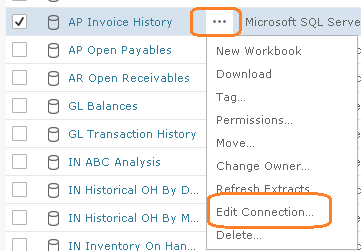
OR you can add the impersonation user after publishing, from within the Web Server. From the Content menu > Data Sources tab. Click the ellipsis (...) and Edit Connection.
Add the Run As user (or other user), Test Connection, and Save.
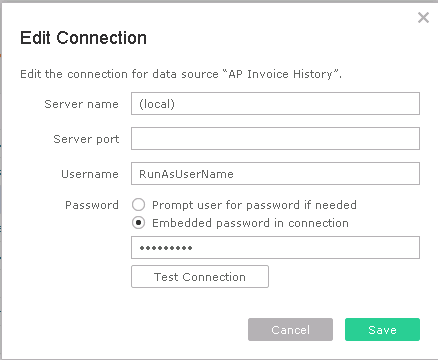
The above lets every user borrow the SQL reading rights for this data. However, the user has to have rights to the published data source in the first place. Set the data source permissions from within DataSelf Web Server as for any other data source.