How to Keep Your Historical Data When Moving to a New ERP
 Although upgrading to a new ERP means faster processes, streamlined operations, and smarter decisions, there’s always a big downside: the loss of transactional and related history.
Invoices, purchase orders, projects, sales trends and the like – they all get left behind.
The result?
Guesswork instead of insight. Hunches instead of metrics. And assumptions instead of KPIs.
You simply can’t afford this when the very survival of your business is at stake.
The Challenge of Historical Data
Every ERP speaks its own language and stores its own unique set of data. Components that are in one solution are absent in another. Reporting tools from one system don’t easily translate to the next. And the sheer scope of a project to bring over legacy data from one app to another is immense – as are the time, money, and technical expertise required to make that happen.
Too often businesses moving from one ERP to another are forced into choosing between 4 bad options:
- Continue with an outdated and inefficient ERP system.
- Lose historic data (and hope that no one will notice).
- Run the old and new ERP systems in parallel (and ignore the screams of end users).
- Spend a fortune on custom coding to migrate history (and hope that the CFO is in a generous mood).
The Best Way Retain Historical Data
The key to retaining historical data when moving to a new ERP is simple: a Data Warehouse.
Either standalone or as part of a BI-based Reporting System, a Data Warehouse is designed not only for storing data, but also for blending data from multiple sources. It is the ideal (and affordable) solution for the challenge of historical data loss because it can: analyze data between different types of applications (such as between an ERP and CRM systems); or as is applicable to this scenario – it can analyze data between legacy and current versions of the same data.
The key to using a data warehouse for historical data blending is a tool called ETL. Standing for (E)xtract, (T)ransform, and (L)oad, ETL is the workhorse that retrieves, cleanses, and standardizes the data from a legacy-to-a-current ERP system. In this process, ETL enables reporting of the combined ERP data.
Most importantly, ETL automates the data modeling process for both the legacy and current ERP systems. This not only expedites the data blending process, but it also eliminates the need to have one or more high-priced data analysts spend days – if not weeks – reconciling the two ERP’s disparate database schemas.
And by streamlining the data blending process, you no longer are forced to choose “whether it’s worth it” to bring over critical ERP legacy data for meaningful analysis and strategic decision-making!
Whether it’s just one year of invoice data or multiple years’ of all transactional histories, the ETL data warehousing approach accommodates both – and with nearly the same amount of time and effort.
How a Data Warehouse Blends Historical Data
The following illustration shows how a data warehouse blends data from both a legacy and current ERP application:
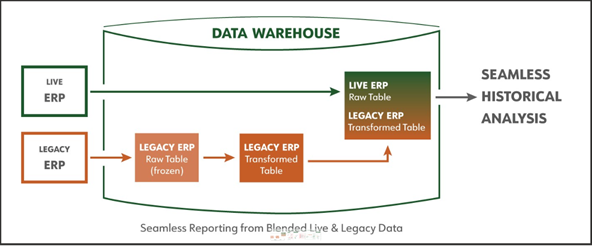
First, legacy transactions (from the old ERP) are duplicated and ‘frozen’ in the data warehouse, (at which time organizations can optionally decommission the old ERP system).
Then, via automated data modeling, ‘mapping rules’ connect transactional data fields from the old data to the corresponding fields in the new ERP system. At this point, transactional data is effectively blended and ready for analysis and reporting. Business users will be able to analyze their historical transactions as if they never changed their ERP system.
With this configuration in their data warehouse, organizations get the historical analysis, strategic insight, and long-term auditing they require.
Learn more about DataSelf’s ETL+ Data Warehousing technology.
(And if you’d like to discuss how this can benefit your business, contact us today.)