Cold Customers Report: How Distribution Companies Identify Underperforming Customers, Items, and Sales Reps
 Whether it’s poorly-performing customers, items, or regions, the common theme is the need to know “who (or what) is not performing well”. DataSelf provides this visibility by enabling you to select which subject (or “dimension”, such as customer, item, or region), you wish to report on.
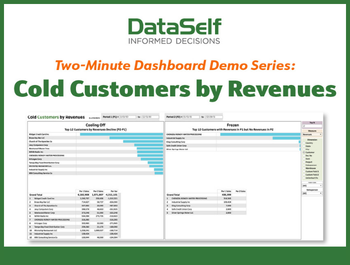
The Cold Customers by Revenues report shows this report for the dimension of “customer”. (You can choose from a pre-configured (and customizable) list of twelve different dimensions on the right side of this report.) The three most popular dimensions are customer, item, and salesperson. Note that although this report defaults to totaling revenues, it may also total gross profits, cost-of-goods sold, and quantity sold.
Here are the top business insights from a “Cold Customers” report:
- Who are your lowest revenue-producing clients (& their revenue totals)
- Whether many of your low-producing clients are from the same region
- Whether certain salesreps have a majority of low-producing clients
- Whether most of your low-producing clients are buying the same products
- Whether clients with the biggest revenue drop are from the same region
- Whether clients with the biggest revenue drop belong to the same salesreps
- Whether clients with the biggest revenue drop have stopped buying the same products
- Which clients’ revenues have decreased the most (& by how much)
Keep in mind that all of the above insights – which relate to the revenues generated by your worst-performing customers (and those with the greatest decrease in revenues) can also apply to any other dimensions you wish to analyze. So, whether it’s poorly-performing items, or regions with the least revenue growth, this one report can provide a wealth of business insight across your organization.
The report includes the following components:
KPIs: total revenues, tot gross profit, total COGS, total quantity sold
Totaled by: 12 default, customizable fields including customer, product, salesreps, region
Selectable by: item, salesperson
Timeframe: two selectable time periods (for both revenues and revenue growth)
Special: ability to select “top x” records, such as “top 12 customers by revenue”
Check out this two-minute video demo of DataSelf’s Cold Customers report here >>